ith the Brand Kit, you set up your brand elements once – logos, colors, and a default avatar – and reuse them everywhere in Omnora.
That way, your videos and trainings automatically look consistent, without starting from scratch on every project.
The Brand Kit is free and set up in just a few minutes. 🚀
Your brand elements flow straight into your videos
Once you've set up your brand elements in the Brand Kit, they're used in the following scenarios:
-
Creating AI videos
Your brand elements are automatically applied when you create AI videos. Our design templates aren't a rigid scheme – they're tailored individually to your brand, with your colors, logos, and fonts built right into the templates. So every video is in your look from the very start. -
Editor
And when you design manually, you stay flexible too: all your brand elements are available to you at any time in the editor.
Where to find the Brand Kit
You'll find the Brand Kit as its own tab in your account settings. The tab is visible to the content managers in your organization – that is, everyone who's allowed to manage content.
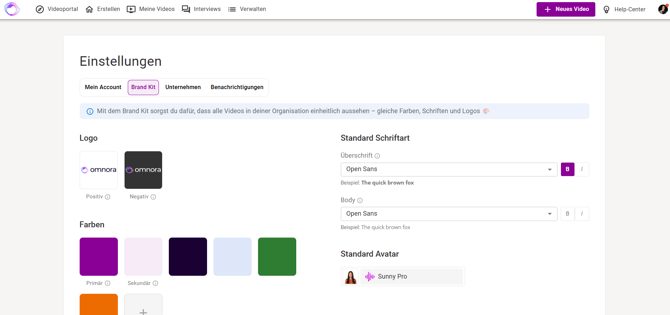
What you can set up in the Brand Kit
Logos
Upload your logo in two variants: a light one for dark backgrounds and a dark one for light backgrounds. That way, your logo looks great in any situation. Both are optional – you decide what you add. Supported formats are JPG and PNG files up to 10 MB.
Colors
Set your primary and secondary color, and add up to eight more colors if you like – ten in total. A click on the plus opens the color picker, and your selected color appears right away in a color card. Colors can be adjusted or removed at any time.
Only the primary color is taken into account when creating our design templates.
Fonts
Choose a default font for headlines and one for body text – each with matching formatting like bold or italic. That keeps your typography consistent everywhere.
Note on fonts: A selection of Omnora fonts is available; you cannot upload your own fonts.
Default avatar
Set a default avatar that's automatically pre-selected when you create something. That saves you a step with every new video.
💡 The Brand Kit applies to your entire company – so whatever you set up here is available to everyone.
Good to know
✅ Everything is saved automatically
No need to think about it: there are no save buttons in the Brand Kit. Every change is applied instantly. You adjust something – done.
✅ Removing a logo or color
When you remove a color or logo from the Brand Kit, it disappears from the selection for your company. But it stays in place in videos you've already created and used it in. So you won't lose any finished content.
Questions? Send us a message – we're happy to help!