---
title: Roles, availability and access
description: "Roles and access in Intelligence Management: Standard and Manager, initiative roles, enabled features, trial and notice pages."
---
[Skip to content](https://help.omnora.com/en/help-center/roles-availability-and-access#main-content)
- [English](https://help.omnora.com/en/help-center/roles-availability-and-access)
- [Deutsch](https://help.omnora.com/de/help-center/rollen-freischaltungen-und-zugriff)
English
Show submenu for translations
Open main navigation
Close main navigation
- - [English](https://help.omnora.com/en/help-center/roles-availability-and-access)
- [Deutsch](https://help.omnora.com/de/help-center/rollen-freischaltungen-und-zugriff)
English
Show submenu for translations
What do you want to know?
- There are no suggestions because the search field is empty.
1. [Omnora Help Center](https://help.omnora.com/en/help-center?hsLang=en)
2. [Intelligence Management](https://help.omnora.com/en/help-center/intelligence-management?hsLang=en)
3. [Administration](https://help.omnora.com/en/help-center/intelligence-management?hsLang=en#administration)
November 6, 2026
# Roles, availability and access
## Understand why you see a feature or not, and what the notice pages mean.
### Overview
What you see and can do in Intelligence Management depends on three things: your role in the organization, your role in an initiative, and the features enabled for your organization.
### Roles in the organization
- **Standard:** creates and manages their own interviews and sees their own results plus the results of initiatives and interviews they may view.
- **Manager:** sees and manages all interviews, results and source collections of the organization. Depending on the setup, also uses the organization's chatbot, **Documents**, the **Knowledge Base** and **Settings**.
Omnora sets up the roles for Intelligence Management. If you need a different role, contact your Omnora contact person.
### Roles in an initiative
- **Managers** steer the initiative and its results. Whoever creates the initiative is always a manager. The role is only for people with an account.
- **Knowledge givers** take interviews, add documents and can maintain the initiative's results.
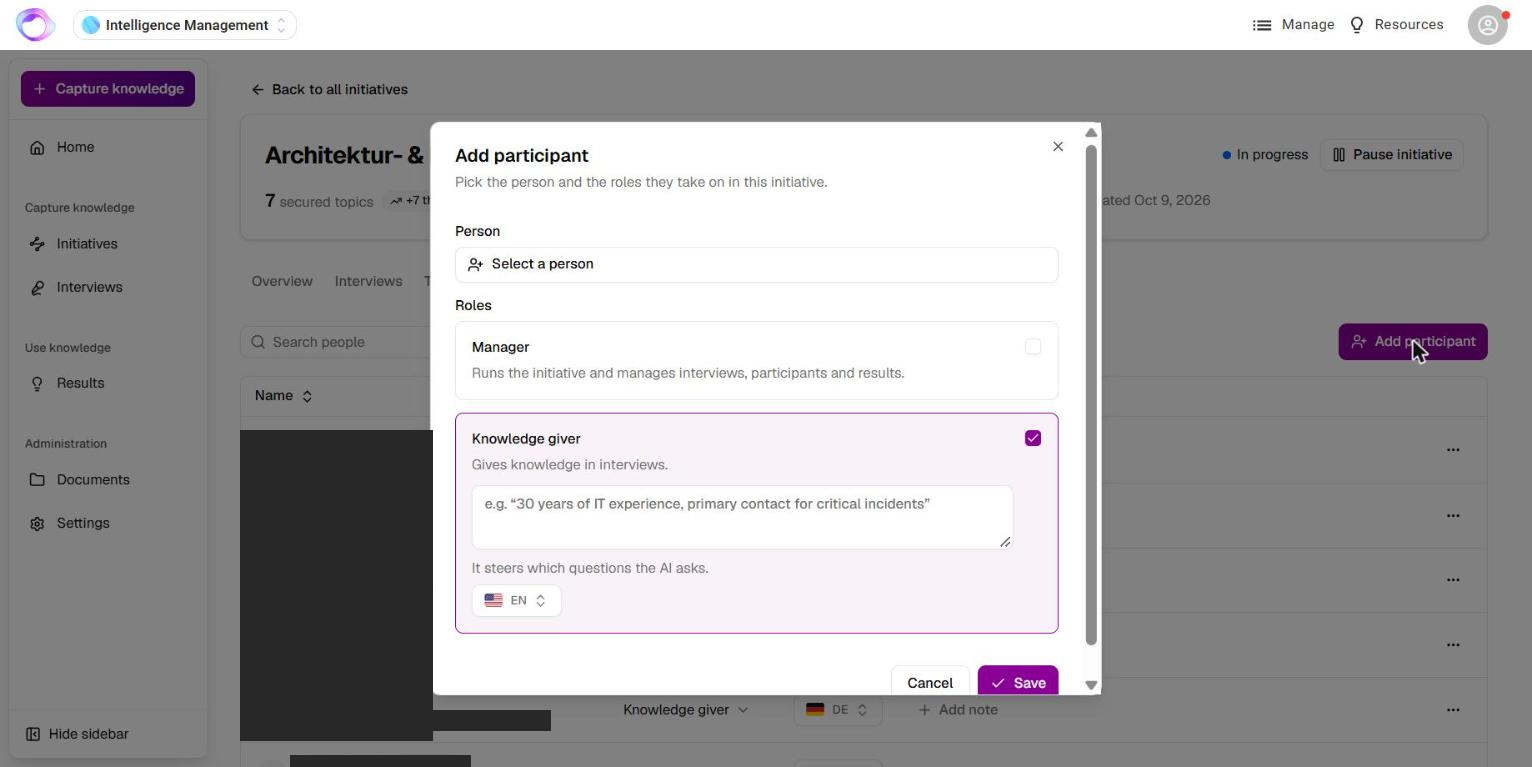
Everyone who may view an initiative also sees its results and can chat with its chatbots.
### Features depending on your setup
Some features are only active if they are enabled for your organization, for example initiatives, single interviews, external participants, meeting booking, screen sharing, individual result types such as Video, Podcast, Chatbot or MCP Server, further languages and connecting AI assistants. Result types that are not enabled appear as **Coming soon**. Your Omnora contact person arranges enabling features. New accounts and trials have external participants on from the start.
### What the notice pages mean
- **Intelligence Management not enabled:** your organization does not have Intelligence Management. **Contact sales** reaches us.
- **Trial period expired:** your organization's trial has ended. Public chatbot links, MCP server connections and interview invitation links keep working.
- **Interviews not enabled:** interviews are not active for your organization.
- **Access not allowed:** you are signed in, but your role doesn't allow this area. Check your role with the person responsible.
- **Sign-in required:** your session has expired. Reload the page.
- **Page not found:** the link is wrong, outdated or belongs to someone else.
- **Page unavailable:** the page could not be loaded. **Go to Home** takes you back.
---
### Frequently asked questions
**A menu item or button is missing. Is that a bug?**
Usually not. Missing items are normally due to your role or to what is enabled for your organization. Tell support which area you are looking for.
**Who can create interviews for other people?**
That depends on your role and on what is enabled for your organization. Contact your Omnora contact person.
**Who can see my interviews?**
You, the managers of your organization and, for interviews in an initiative, the members of that initiative.
---
**Questions?** Send us a message, we are happy to help!
- [Intelligence Management](https://help.omnora.com/en/help-center/intelligence-management?hsLang=en#main-content)
- [Capture knowledge](https://help.omnora.com/en/help-center/intelligence-management?hsLang=en#capture-knowledge)
- [Transfer knowledge](https://help.omnora.com/en/help-center/intelligence-management?hsLang=en#transfer-knowledge)
- [Administration](https://help.omnora.com/en/help-center/intelligence-management?hsLang=en#administration)
- [Authoring Automation](https://help.omnora.com/en/help-center/authoring-automation?hsLang=en#main-content)
- [Create](https://help.omnora.com/en/help-center/authoring-automation?hsLang=en#create)
- [Edit](https://help.omnora.com/en/help-center/authoring-automation?hsLang=en#edit)
- [Roll out](https://help.omnora.com/en/help-center/authoring-automation?hsLang=en#roll-out)
- [Administration](https://help.omnora.com/en/help-center/authoring-automation?hsLang=en#administration)
- [Legal Notice](https://omnora.com/en/imprint)
- [Privacy Policy](https://omnora.com/en/privacy)
- [Terms of Use](https://omnora.com/en/terms-of-use)
- [Terms and Conditions](https://omnora.com/en/terms)
[](https://omnora.com/de/?hsLang=en)
Omnora GmbH
Gutleutstraße 163-167
60327 Frankfurt am Main
Germany
[mailto:support@omnora.com](mailto:support@omnora.com)
© 2026 Omnora GmbH