---
title: How Intelligence Management works
description: "Overview of Intelligence Management: initiatives, AI interviews, knowledge reports and results, the sidebar and Home."
---
[Skip to content](https://help.omnora.com/en/help-center/how-intelligence-management-works#main-content)
- [English](https://help.omnora.com/en/help-center/how-intelligence-management-works)
- [Deutsch](https://help.omnora.com/de/help-center/so-funktioniert-intelligence-management)
English
Show submenu for translations
Open main navigation
Close main navigation
- - [English](https://help.omnora.com/en/help-center/how-intelligence-management-works)
- [Deutsch](https://help.omnora.com/de/help-center/so-funktioniert-intelligence-management)
English
Show submenu for translations
What do you want to know?
- There are no suggestions because the search field is empty.
1. [Omnora Help Center](https://help.omnora.com/en/help-center?hsLang=en)
2. [Intelligence Management](https://help.omnora.com/en/help-center/intelligence-management?hsLang=en)
3. [Capture knowledge](https://help.omnora.com/en/help-center/intelligence-management?hsLang=en#capture-knowledge)
October 30, 2026
# How Intelligence Management works
## Understand the path from expert knowledge to a finished result and find your way around the app.
### Overview
Intelligence Management secures knowledge that often exists only in a few people's heads. An AI interviewer talks to your experts, Omnora turns the conversations into knowledge reports, and you create results such as documents, slide decks or chatbots from the secured knowledge.
1. **Capture knowledge:** you create an initiative or a single interview.
2. **Hold interviews:** knowledge givers talk to the AI interviewer in their browser.
3. **Review knowledge:** every completed interview produces a knowledge report that the knowledge giver reviews and corrects.
4. **Use knowledge:** you create results from interviews, documents and initiatives.
### Step 1: Open Intelligence Management
Intelligence Management runs in the same Omnora app as Authoring Automation. You do not need a separate sign-in.
1. Sign in to Omnora.
2. Switch to **Intelligence Management** with the product switcher at the top left.

### Step 2: Get to know the sidebar
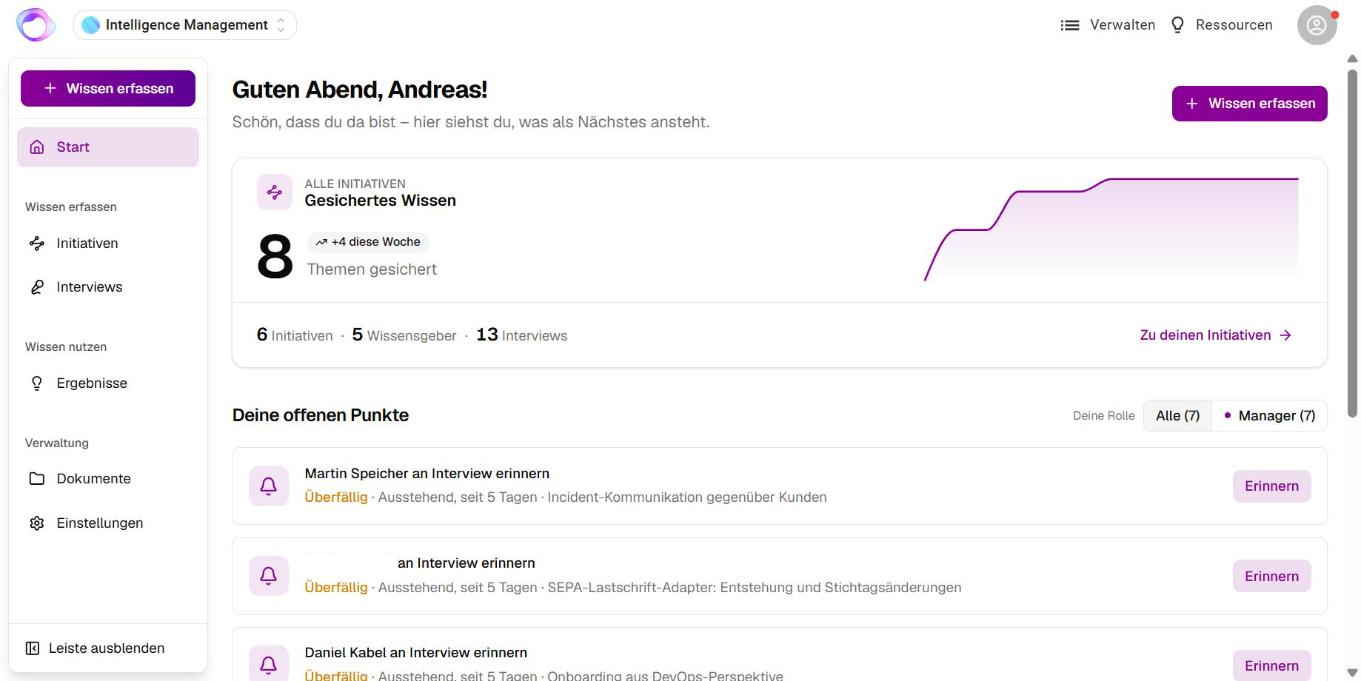
The sidebar follows the path of knowledge:

- At the top: the **Capture knowledge** button and **Home**.
- **Capture knowledge:** **Initiatives** and **Interviews**.
- **Use knowledge:** **Knowledge Base**, **Chatbot**, **Results** and **Knowledge graph**.
- **Administration:** **Documents** and **Settings**.
You only see the items your role and your organization's setup allow. **Hide sidebar** collapses the sidebar.
### Step 3: Use Home
**Home** lists what is next for you under **Your open items**: start or continue interviews, review suggestions, remind people, review highlights in a knowledge report and finish initiatives. Overdue items come first.
If you are both a manager and a knowledge giver, filter the list with **All**, **Manager** and **Knowledge giver**. The **Knowledge secured** card shows how many topics are secured and how many initiatives, knowledge givers and interviews there are.
💡 Which features you see depends on your role and on what is enabled for your organization. See the article “[Roles, availability and access](https://help.omnora.com/en/help-center/roles-availability-and-access?hsLang=en)”.
### Getting started in four videos
Four short videos (2 to 3 minutes each) show you how to get started:
1. **Intro:** what Intelligence Management does and how experience-based knowledge is captured, structured and passed on (at the top of this page).
2. **Initiatives:** how to start your first initiative and decide which knowledge to secure. In the article “[Create a knowledge initiative](https://help.omnora.com/en/help-center/create-a-knowledge-initiative?hsLang=en)”.
3. **AI Interview:** how the AI interviews your knowledge givers and documents their experience automatically. In the article “[Take an AI interview](https://help.omnora.com/en/help-center/take-an-ai-interview?hsLang=en)”.
4. **Knowledge Transfer:** how to pass secured knowledge on to colleagues. In the article “[Create and share results](https://help.omnora.com/en/help-center/create-and-share-results?hsLang=en)”.
---
### Frequently asked questions
**Do I need a separate account for Intelligence Management?**
No. You use your Omnora account and switch to Intelligence Management at the top left. Knowledge givers without an account take interviews through a personal link if your organization has this enabled.
**Why do I see “Intelligence Management not enabled”?**
Intelligence Management is not enabled for your organization yet. Contact your Omnora contact person.
**Which languages are available for interviews and results?**
German and English by default. Further languages depend on what is enabled for your organization.
---
**Questions?** Send us a message, we are happy to help!
- [Intelligence Management](https://help.omnora.com/en/help-center/intelligence-management?hsLang=en#main-content)
- [Capture knowledge](https://help.omnora.com/en/help-center/intelligence-management?hsLang=en#capture-knowledge)
- [Transfer knowledge](https://help.omnora.com/en/help-center/intelligence-management?hsLang=en#transfer-knowledge)
- [Administration](https://help.omnora.com/en/help-center/intelligence-management?hsLang=en#administration)
- [Authoring Automation](https://help.omnora.com/en/help-center/authoring-automation?hsLang=en#main-content)
- [Create](https://help.omnora.com/en/help-center/authoring-automation?hsLang=en#create)
- [Edit](https://help.omnora.com/en/help-center/authoring-automation?hsLang=en#edit)
- [Roll out](https://help.omnora.com/en/help-center/authoring-automation?hsLang=en#roll-out)
- [Administration](https://help.omnora.com/en/help-center/authoring-automation?hsLang=en#administration)
- [Legal Notice](https://omnora.com/en/imprint)
- [Privacy Policy](https://omnora.com/en/privacy)
- [Terms of Use](https://omnora.com/en/terms-of-use)
- [Terms and Conditions](https://omnora.com/en/terms)
[](https://omnora.com/de/?hsLang=en)
Omnora GmbH
Gutleutstraße 163-167
60327 Frankfurt am Main
Germany
[mailto:support@omnora.com](mailto:support@omnora.com)
© 2026 Omnora GmbH